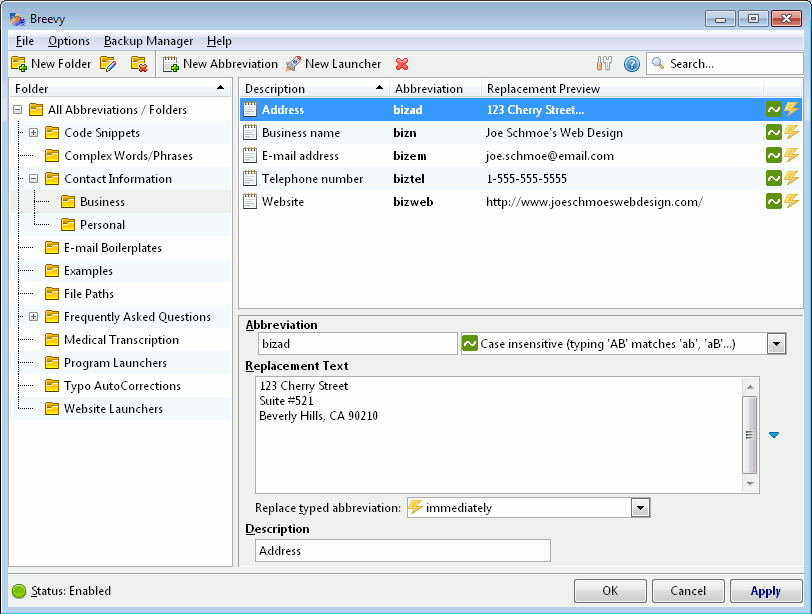
Breevy's main window. |
 |  |
| v8.12 - Free 14-Day Trial Released 4/23/24 (changes) |
30-Day Money-Back Guarantee |
|
|
|
|
- Michael Mortimer, Plaintiff Magazine
- James G.
- R.J.B.
- Niamh Lynch, Editor, Softonic.com
- Dirk W.
- LJ, Simple Productivity Blog
- Helge G. |
 I have been using [Breevy] for a couple of months now, and I love it. Used correctly, it will become one of the most essential pieces of software in your office. ... Breevy is fantastic. ... I guarantee, use it for a few weeks; you won't be able to pay for it fast enough. It's that good.
 I did want to share with you that after using Breevy for a while I am very impressed with it, and have found it to be an indispensable tool. I plan to purchase it when my trial is over; in fact I have already recommended it to a few of my co-workers. Keep up the good work!

|
FYI... While we like to call Breevy a text expander, you could also call Breevy a global AutoCorrect, AutoText, replace as you type, or text replacement software program. |
Breevy's Features
Breevy, now known as aBreevy8, is way more than just a regular ol' text expander for Windows and AutoText program. Listed below are just some of Breevy's features.
Don't see a feature listed below that you really think Breevy could use? First, try downloading the latest version of the program. If the feature you want still isn't there, we'd love to hear about it. We're always looking to improve Breevy.
 |
Fast and easy to use. We tried to make Breevy as fast, easy to use and straightforward as possible. Because who likes slow, bloated, confusing software? Not us. |
|
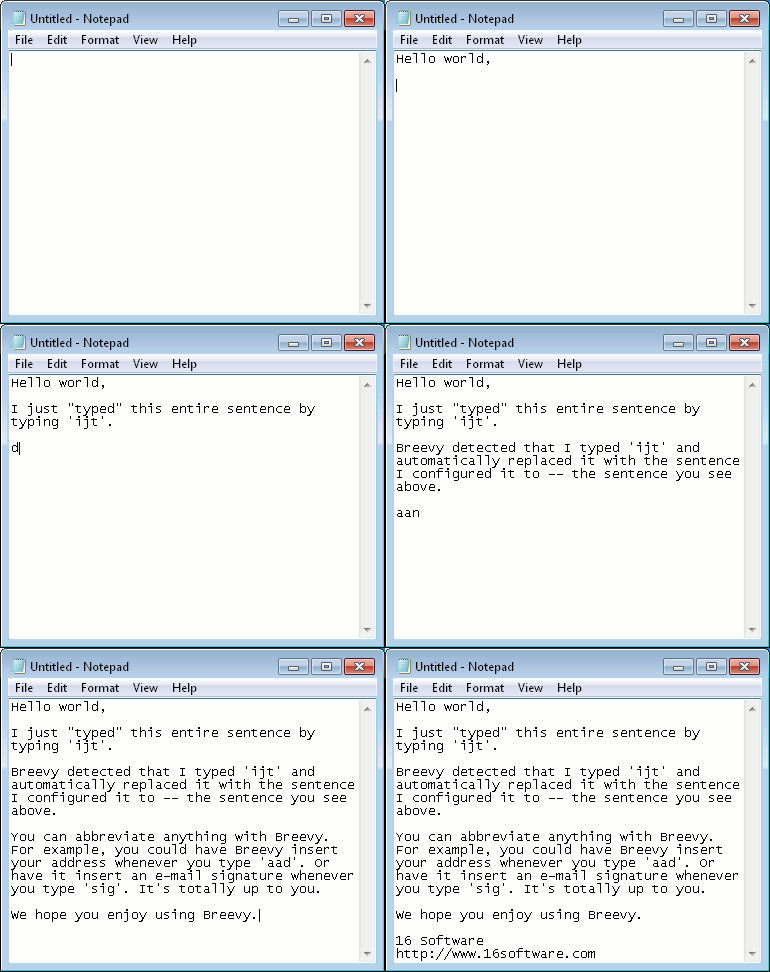
Create your own custom abbreviations. The process takes just seconds. First, think of something you often type. Then, think of something shorter you'd rather type instead. Finally, click Apply, and whenever you want to type the longer text, type the shorter text instead, and Breevy will replace it for you instantly. It's that easy. |
|
Logical organization with folders. Place your e-mail boilerplate abbreviations in the E-mail Boilerplates folder, your contact info abbreviations in the Contact folder, your medical term abbreviations in the Medical Transcription folder, and so on. |
|
Import and sync with your TextExpander snippets. Breevy can import as well as sync with (via Dropbox) the snippets you created in TextExpander, so that even if you're away from your Mac you'll never be away from your snippets. |
|
Typo AutoCorrection in any program. Breevy comes with a list of over 6500 abbreviations to automatically correct your spelling errors and typos in any application. Just click File -> Import Typo AutoCorrections and you'll never have to worry about typos again. |
|
Breevy is fully portable, which means you can run it from a USB flash drive without installing it on the computer it's running on, and Breevy will store all of your data (abbreviations, preferences, etc) on the flash drive. This allows you to take your abbreviations with you and use them wherever a Windows computer is available. You can download the portable package here. |
|
Import AutoCorrect entries from Microsoft Word. Already spent time creating AutoCorrections in Microsoft Word? No problem. Just click File -> Import Microsoft Word AutoCorrections and Breevy will import them for you, allowing you to use them in any application -- not just Microsoft Word. |
|
Position the cursor and insert the clipboard contents anywhere. Breevy lets you place the cursor wherever you'd like in the replacement text. You can also include the clipboard contents in the replacement text output as well. |
|
Date and time insertion. You can have Breevy output the current date and/or time in the replacement text, too. |
|
Smart case adaption. By default, Breevy will convert the case of the replacement text to match the case of the abbreviation you typed. For example, if you type the abbreviation with the first letter capitalized, then Breevy will capitalize the first letter too. Of course, if you don't want case adaption, you can turn it off and use one of the other match modes (case insensitive or case sensitive). |
|
Control when the abbreviation is expanded. You can have Breevy replace your typed abbreviation:
|
|
Dynamic input using the %(Input) macro. Breevy can pause in the middle of an abbreviation's expansion to allow you to insert custom text. For example, you could have an abbreviation ddear with the replacement Dear %(Input), I am writing you regarding %(Input). After you typed ddear, Breevy would first output Dear, then pause for your input. When you were finished typing, you would press Tab and Breevy would continue outputting the rest of the replacement text, until the next %(Input) was found. |
|
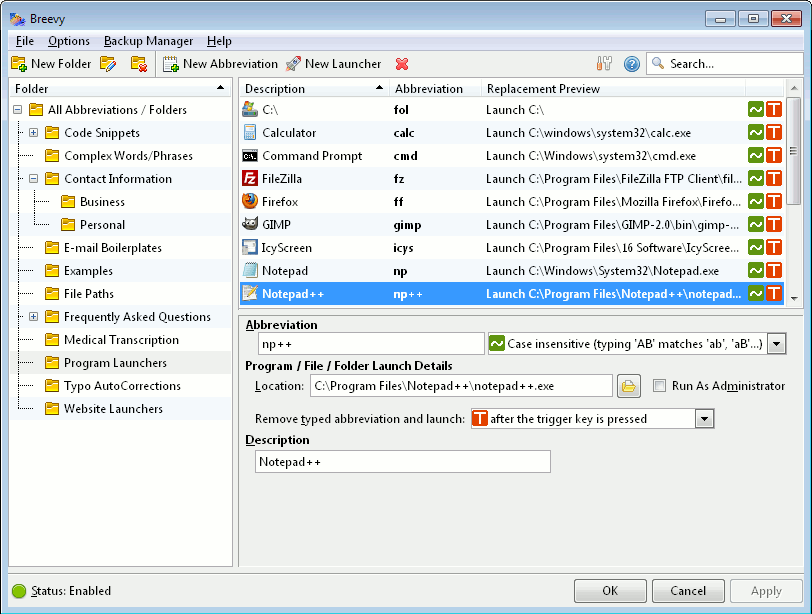
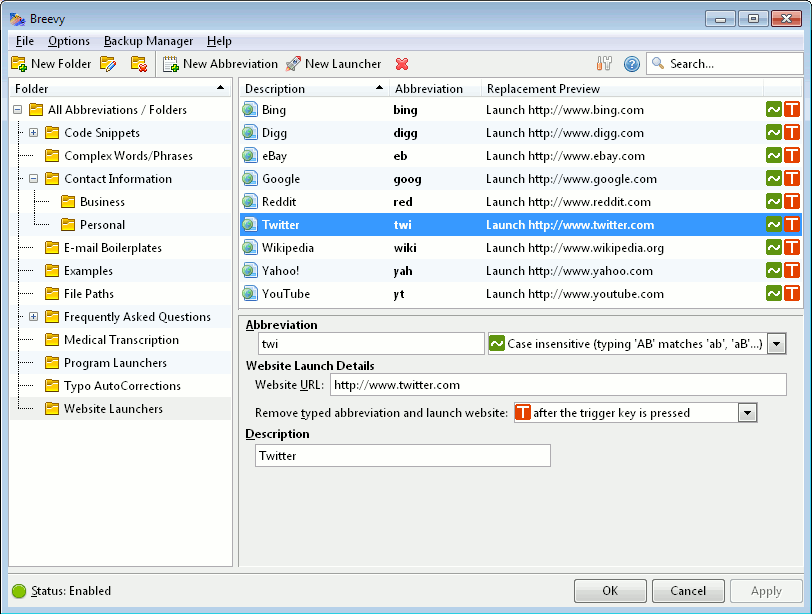
Launch applications, websites, and more. Your favorite applications, websites, files, and folders are just a few keypresses away with Breevy. Want to launch the calculator? Just type calc. Perhaps you'd like to open your download folder? Just type fol. Type the launcher abbreviation anywhere, or optionally in the LaunchPad. It's that easy. |
|
Dropbox sync support. Have more than one computer and don't feel like having to make sure all of your computers are using the same abbreviations each time you make changes to them on one of your computers? No problem. Just install Dropbox if you haven't already (it's free and used by over 4 million people), enable Dropbox sync in Breevy, and then Breevy will make sure all of your computers are using the same abbreviations. |
|
Over 13,500 abbreviations for medical transcriptionists. Also included is over 13,500 (really!) abbreviations just for medical transcriptionists. Just click File -> Import Medical Transcription Set. |
|
Works in any Windows application. No matter what application you're typing in, Breevy can automatically replace and expand your typed abbreviations. Breevy runs on Windows 2000, XP, Vista, 7, and 10. |
|
Import your Shorthand abbreviations. Currently using Shorthand and want to make the move to Breevy? Just click File -> Import Shorthand Dictionary and Breevy will import your Shorthand keywords automatically. |

| |
| v8.12 - Free 14-Day Trial Released 4/23/24 (changes) |
30-Day Money-Back Guarantee |